Skip to content Skip to the floor plan
WAREHOUSEby RDCopilot

WMS · WAREHOUSE 01 · GROUND FLOOR

Less paperwork on the warehouse floor.

Receiving, put-away, picking, packing and stock counts on handheld scanners, set up around your aisles, your labels and your devices. Every scan posts to one stock record.

Setup fee + monthly licence · EU hosting · Support in English and Romanian

  • Receipts and transferson the handheld
  • Stock countswith barcode scans
  • Labelsfor bins, items and parcels

WH01 · GROUND FLOORExample data

Rack level shown on the map
  • Empty
  • Partly full
  • Full
  • Route

Bin inspector

Location
B-04-1 right face, level 1
Zone
Pick face
Item
CRT-40 Shipping carton 40×30×20
Lot
—
Expiry
—
On hand
48
Reserved
12
Available
36
Min / Max
20 / 80
Last movement
Put away · REC-0142 · 09:41

Select a bin to inspect it. Switch the level to see reserve stock on top of the racks.

AISLE A · RECEIVE

Scan the delivery against what you ordered.

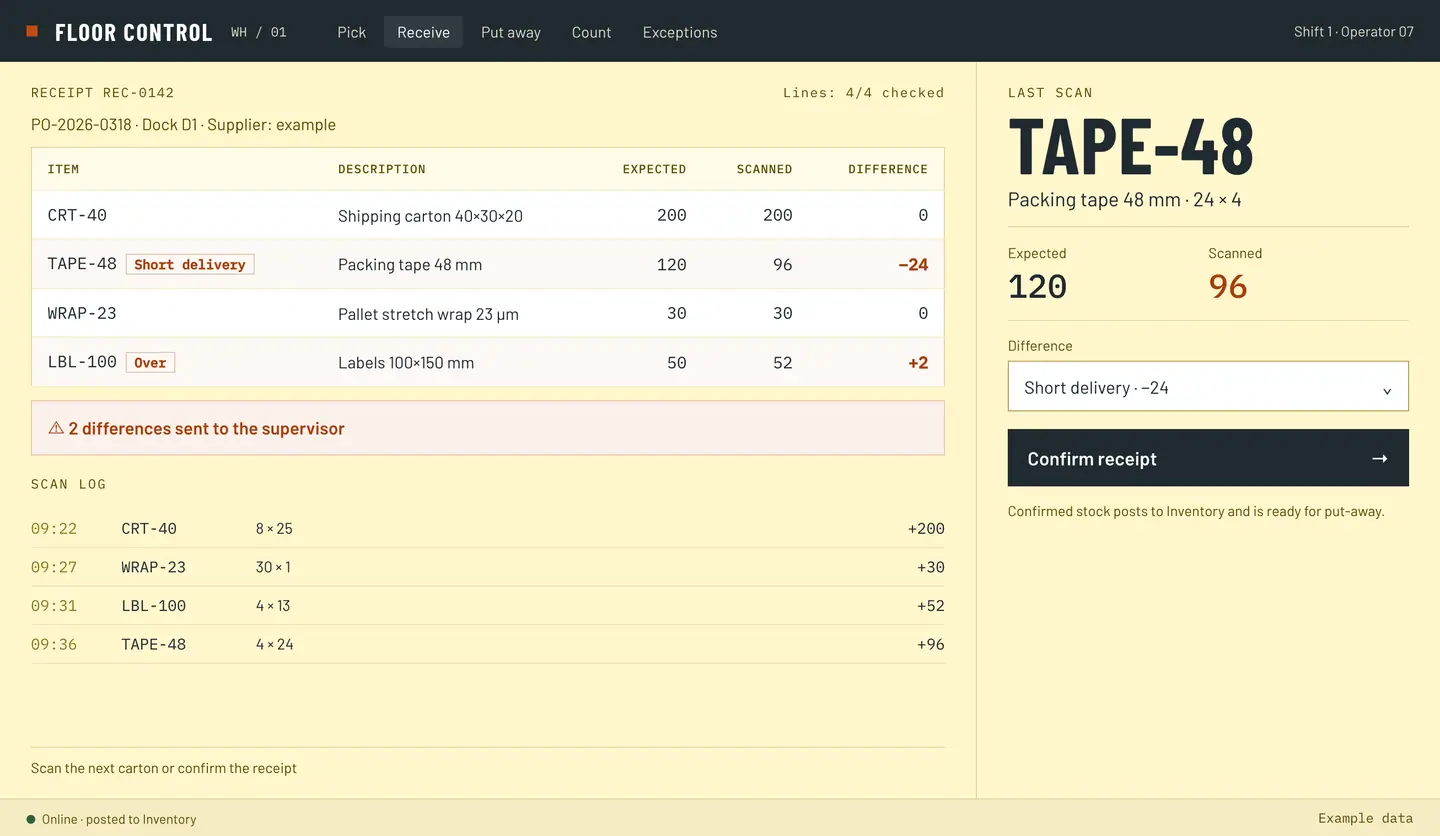
The operator opens the expected receipt on the handheld, scans each item or carton and enters the quantity. Differences (short, over, damaged, wrong item) are recorded with a reason on the spot and go to the supervisor, not into a notebook. When the receipt is confirmed, stock is posted to Inventory and ready for put-away.

  • Scan the barcode; type the quantity when there is no code
  • Differences recorded with a reason and sent to the supervisor
  • Expected receipts can be prepared from purchase orders in ERP, agreed per project
  • Lots, serial numbers and expiry dates are set up per item where your goods need them
  • In Romania: confirmed quantities and receipt differences can be passed to the goods receipt note (NIR), agreed per project

Design a barcode receiving flow around the warehouse floor

REC-0142 · PO-2026-0318 · Dock D1Example data
Receipt REC-0142: expected and scanned quantities
ItemExpectedExp.ScannedDifferenceDiff.
CRT-40 200200 0
TAPE-48Short delivery 12096 −24
WRAP-23 3030 0
LBL-100Over 5052 +2
2 differences sent to supervisor

AISLE B · PUT AWAY

A suggested bin, confirmed by a scan.

After receipt, the operator scans the bin label where the goods are placed, so the stock record knows the exact location. Where you want it, each line can show a suggested location from rules agreed in the project; if the operator chooses another bin, the scan records where the goods really went.

Example rules

  • FIXED FACE
  • SAME ITEM
  • FREE CAPACITY
  • RESERVE ZONE
  • EARLIEST EXPIRY

Rules are chosen during setup to fit your floor.

Move between bins

Moving goods to another bin is a scanned transfer: scan the source bin, the item and the quantity, then the destination bin. The old place is emptied and the new one filled in the same movement.

Replenishment

Replenishment from reserve to pick faces can be set up with minimum and maximum levels per location, so pickers don’t find an empty shelf. Thresholds and who triggers the move are agreed per project.

Put-away tasks · REC-0142Example data
  1. TAPE-4896 pcssuggested B-02-1 · scanned B-02-1Confirmed
  2. CRT-40200 pcssuggested B-04-1 · scanned B-06-1Changed
  3. GLV-Mmin 20 · on face 8move 40 from E-06-3 → C-01-1Replenish
  • Dock to bin
  • Reserve to pick face
MV-0218 · GLV-M · 40 pcs · E-06-3 → C-01-1Example data
  1. FromE-06-3
  2. ItemGLV-M × 40
  3. ToC-01-1

AISLE C · PICK

Pick the way your orders actually arrive.

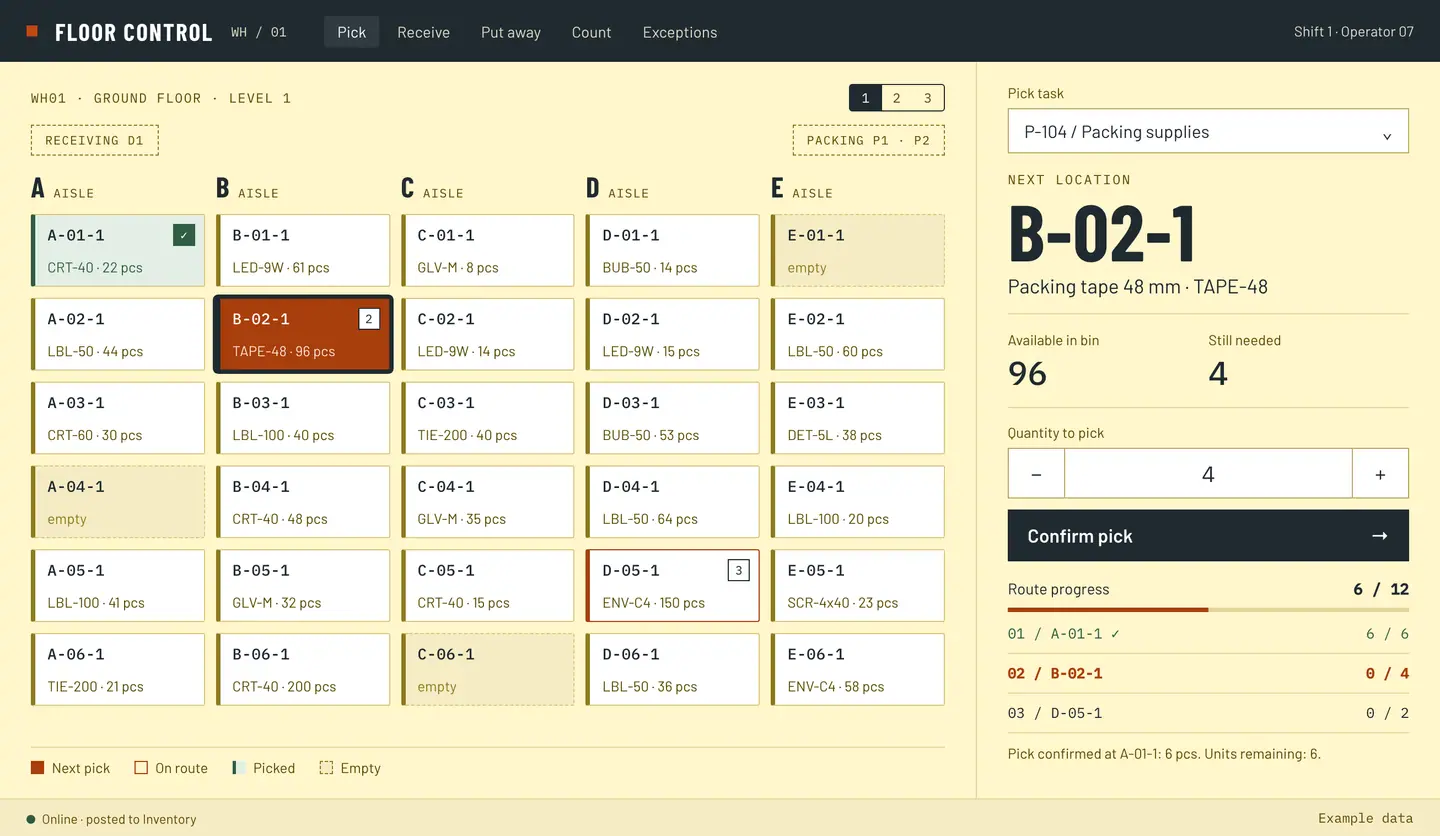
Single-order, batch, wave, zone or cluster picking. The strategy is set per warehouse, client or shift during setup; the handheld shows one location, one item and one quantity at a time, in walking order.

Pick strategy

Batch ORD-5521…5526

The same items across several orders, picked in one walk and split at packing. Fits: Many small orders with repeating items.

Stops
6
Aisles visited
A, C, D
Lines
14
Units
52

Walking order: Pack P1 → A-03-1 → A-01-1 → C-04-2 → C-09-1 → D-11-2 → D-06-1 → Pack P1

Example data

Empty shelf or short quantity? The picker records it, the original instruction stays visible and the supervisor decides: replenish, substitute or ship short.

What a picker should do when the shelf is empty

Try a pick on the handheld screen
Next locationA-01-1Shipping carton 40×30×20
Available in bin22
Still needed6
Route progress0 / 12
  1. 01 / A-01-10 / 6
  2. 02 / B-02-10 / 4
  3. 03 / D-05-10 / 2

Choose a quantity, confirm it, then go to the next location.

AISLE D · PACK

Check the box before it is closed.

Where your process calls for it, every item is scanned into the parcel at the pack station. A wrong item or a missing line stops the parcel, not the customer. Then the label and the delivery note are printed on the station printer.

  • Shipping label printed at the station
  • Scan-to-verify on every line, configured per project
  • Delivery note (in Romania, the aviz) and parcel weight or dimensions, where your process needs them, agreed per project
  • Carrier labels set up per project, depending on the carriers you use
Pack station P2 · ORD-5524Example data
  • CRT-40× 2Verified
  • TAPE-48× 6Verified
  • LBL-100× 1Scanned LBL-50Wrong item, scan LBL-100
Parcel on hold until every line is verified
Shipping label 100 × 150 mm for order ORD-5524, parcel 1 of 1, 2.4 kg, addressed to Client exemplu SRL, Cluj-Napoca. FROM WH01 · Dispatch D3 SHIP TO Client exemplu SRL Str. Exemplu 10 Cluj-Napoca ORDERPARCEL ORD-55241/1 · 2.4 kg ORD5524-1/1-WH01
100 × 150 mm label printed at P2

AISLE E · SHIP, TRANSFER & COUNT

Close the dock, then count without stopping the floor.

E1Dispatch

Parcels are scanned onto the loading dock per carrier or route; the shipment is confirmed and stock leaves Inventory. For high-fiscal-risk goods and international road transports that need an e‑Transport declaration (UIT code), shipment data can be passed to RDCopilot e‑Transport, agreed per project.

Dock D3 · Route CJ-2 · 14:00Example data
12/14parcels scanned onto the dock

ORD-5524 waiting at P2 (wrong-item check) · ORD-5529 being packed
E2Transfer between warehouses

Goods for another warehouse are scanned out at the source, shown as in transit, and scanned in at the destination. Anything that arrives short goes to the supervisor, like a receipt difference. Between sites the transfer travels with a delivery note (aviz); inside one site it is a transfer slip.

TR-0031 · WH01 → WH02Example data
  1. Scanned out 08:20
  2. In transit 08:35
  3. Scanned in 11:40

CRT-40 100/100 · TAPE-48 46/48 · 2 short, sent to supervisor

E3Cycle counts

Count one zone, one aisle or one item with a barcode scan while the rest of the warehouse keeps working. Differences go to the supervisor and corrections are approved, not typed over. Recount rules and thresholds are agreed per project. Cycle counts keep stock right during the year; the annual inventory stays with your inventory commission.

E4Returns

Customer returns can be received with a scan, checked and put back or set aside, with the flow agreed per project.

RET-0012 · ORD-5498Example data
  • LBL-100× 2Good, back to B-03-1
  • LED-9W× 1Damaged, set aside

Supervisor view

One queue for everything that did not go to plan: receipt differences, short picks, wrong-item scans, short transfers, count variances. Each item has an owner, a reason and a decision.

Exceptions · WH01 · todayExample data
TypeReferenceLocationDetailStatus
Receipt difference REC-0142 Dock D1 TAPE-48 −24 Open
Short pick P-107 C-01-1 GLV-M 4 of 10 Replenishment requested
Transfer short TR-0031 WH02 TAPE-48 46 of 48 Open
Wrong item ORD-5524 P2 LBL-50 instead of LBL-100 Open
Count variance CC-0907 E-03-2 LED-9W counted 46, system 50 Recount
Count variance CC-0907 E-05-1 SCR-4x40 −1 box Approved, reversal posted

HANDHELD

Built for the scanner in their hand.

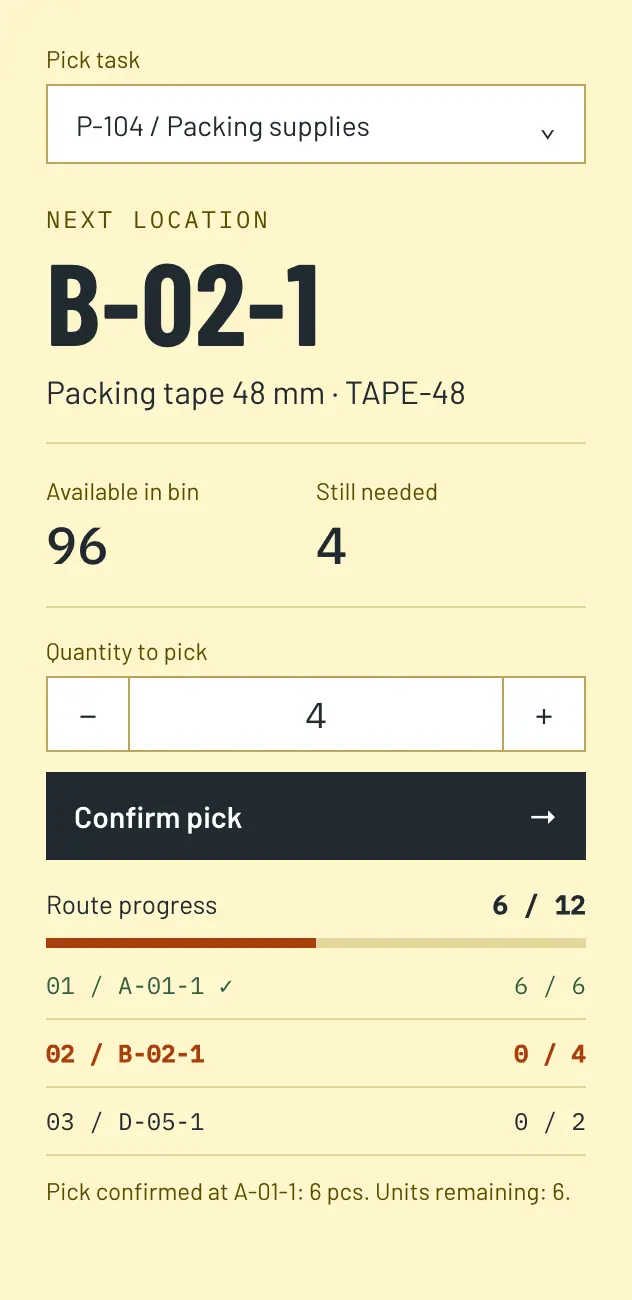
Large targets, one task per screen, scan first and type only when there is no code. The same flows run on rugged handheld terminals, on Android phones with a scanner sleeve, or with a Bluetooth scanner. Devices are chosen and tested with you before rollout.

Mobile pick screen: task P-104, next location B-02-1, packing tape 48 mm, 96 available, 4 still needed, quantity 4, Confirm pick button, route progress 6 of 12.

The screen shows the next location and item. The operator scans the bin label, then the item.

  • OnlinePosted to stock now.
  • Connection lostWhere offline work is agreed for a task, scans are kept on the device.
  • Back onlineOffline scans never overwrite the stock; how they are reconciled is agreed per project.

Which tasks may run offline is agreed per project.

Who sees what

One task per screen, in walking order.

  • Next location, item and quantity
  • Available in the bin and still needed
  • Route progress and the stops left
  • A button to report an empty shelf or a short quantity
See the operator screen on the handheld

ONE STOCK RECORD

One stock record. Every scan posts to it.

Warehouse doesn’t keep a second stock total. Each receipt, move, pick and count is posted as a movement to RDCopilot Inventory, the same record your ERP, tills and self-checkout read. Movements are never edited; a correction is a linked reversal, so you can always see what happened and who approved it.

  1. Warehouse scansreceipt, move, pick, countpost movements to
  2. Inventorystock authorityread by ERP, POS and Self-checkout; sends posting requests to Accounting
  3. ERP · POS · Self-checkout · Accountingread the same stock
Movement ledger · WH01Example data
  1. 09:41REC-0142+96TAPE-48 → B-02-1
  2. 10:12P-104−6CRT-40 · A-01-1
  3. 10:31MV-0218±40GLV-M E-06-3 → C-01-1
  4. 11:12CC-0907−1SCR-4x40 · E-05-1 · reversal, approved by supervisor

From floor walk to the first full shift.

  1. Floor walk

    We walk the floor with you: docks, aisles, zones, how orders arrive and leave.

  2. Locations and labels

    Bin codes are agreed and labels printed for racks and bins.

  3. Flows and rules

    Receiving checks, put-away rules, pick strategy and exception owners are configured.

  4. Devices and pilot aisle

    Scanners and printers are tested, then one aisle or one flow runs live.

  5. Rollout and support

    The rest of the floor follows, with training per shift and support in English or Romanian.

Timeline and scope are agreed per project after the floor walk.

A setup fee and a monthly licence. That’s the model.

01

Implementation

One-off fee, quoted after the floor walk. Covers location setup, flows, labels, device testing, the pilot and training.

02

Licence

Monthly, set by your scope: warehouses, devices and flows. Includes EU hosting, updates and support.

03

Support

Support in English or Romanian from the team that set up your floor. Changes beyond the agreed scope are estimated first and billed at a fixed hourly rate you approve.

Why no price list? Because the setup depends on your floor, devices and existing systems; we quote once we have seen them.

What about scanners? Devices are chosen or tested with you; they are quoted separately if needed. We can also test the ones you already have.

Ask for a quote

Is your floor ready for scanning?

Tick what is already true. Nothing is sent; the list stays in this browser.

0 of 8 ready

Unticked boxes are normal. They become the first items of the project. Go to the request form

From idea to implementation

Guides for your workflow

Questions from the floor

Something specific to your warehouse? Add it to your request and we’ll answer it after the floor walk. Go to the request form

Which devices do we need?

Rugged handheld terminals work best on busy floors; Android phones with a scanner or a Bluetooth scanner can work for smaller teams. We test the devices with you before rollout.

What happens when Wi-Fi drops?

Which tasks may continue without Wi-Fi, and how offline scans are reconciled, is agreed per project. An offline scan never overwrites the stock, and there is no hidden second stock.

We already have stock in another system. Can we keep it?

Warehouse posts to RDCopilot Inventory. If your stock lives elsewhere today, we plan the opening balance and the cut-over during the project, or scope a connection to the existing system.

Our items have no barcodes. Is that a problem?

No. We print internal labels for items and bins during setup, and where a code is still missing the operator enters the item and quantity by hand.

Can we run several warehouses?

Yes. Transfers between warehouses are scanned out at the source and scanned in at the destination (see Aisle E). Locations and rules for each warehouse are set up during the project.

Do you handle lots, serial numbers and expiry dates?

They are set up per item where your goods need them. During the floor walk we agree which items carry lots, serial numbers or expiry dates, where they are scanned and how picking should treat them; that becomes part of the project scope.

How is it priced?

A one-off implementation fee and a monthly licence that includes EU hosting, updates and support, quoted after the floor walk.

How long does implementation take?

It depends on the number of locations, flows and devices. We agree the timeline after the floor walk and start with a pilot aisle.

Bring your floor plan. We’ll map the flow.

Tell us four things and we’ll come back with a first scope: where the goods move, how many orders, which devices and which stock system.

What we ask for

  1. 01Locations & layout
  2. 02Orders per day
  3. 03Devices
  4. 04Stock system today

Availability, integrations and deployment are agreed per project. An inquiry does not activate an account.